One QR code on air. The destination switches itself.
The Scheduler is a new app on the Unitag dashboard. Set a dynamic QR code’s redirect changes in advance, each with its date and time, and they run on their own during the broadcast. It is how a leading French broadcaster handles the on-screen QR codes of its live shows, vote windows included.
1 QR code in the on-air graphics
How it works
Schedule the switches, then let the broadcast run
In the Scheduler, a redirect change is one line: the new URL, the date, the time. Attach as many as you need to one dynamic QR code and each fires at the moment you set. The QR code in your graphics never changes; only where it leads does.
Set every switch in advance
The vote window is typed in before the show: opens 9.05pm, closes 11.10pm. On the night, the control room has nothing to click.
A switch that is already scheduled cannot be forgotten in the rush of a live show.
Chain destinations across a season
Before, during and after each episode, then on to the next one. A whole season of switches can be set in a single sitting.
Take over live when needed
A dynamic QR code’s destination can still be edited by hand at any moment. Scheduling removes the duty of being there; manual control stays available throughout.
2013
platform founded, hosted in the EU
1,000+
recurring clients
189
countries where our QR codes are scanned
Brands such as TF1, Viaplay and AS Saint-Étienne manage their dynamic QR Codes on Unitag.
On air
Two broadcasters, two running orders
A leading French broadcaster schedules the QR codes of its live votes. A Nordic sports broadcaster schedules the ones in its programme promotion graphics. Same app, very different nights.
The live prime-time vote
During live prime-time shows, viewers vote by SMS, by phone and through the QR code on screen. The QR code’s redirect follows the running order: scheduled before air, switched at the exact minute the vote opens and closes.
- One QR code in the graphics, one destination per moment of the night
- Vote opening and closing scheduled ahead of the show
- No manual step in the control room while the show is on air
A sports broadcaster: the week’s grid
Promo graphics during studio shows carry a QR code pointing at the fixture or programme being promoted that night. The destination follows the broadcast grid, scheduled week by week.
- One graphics template all season; only the destination changes
- The week’s switches set in a single session
- Every on-air promo lands on the right programme at the right time
QR code "On-air · Saturday prime time"
Illustrative interface, sample data.
Nobody warned us
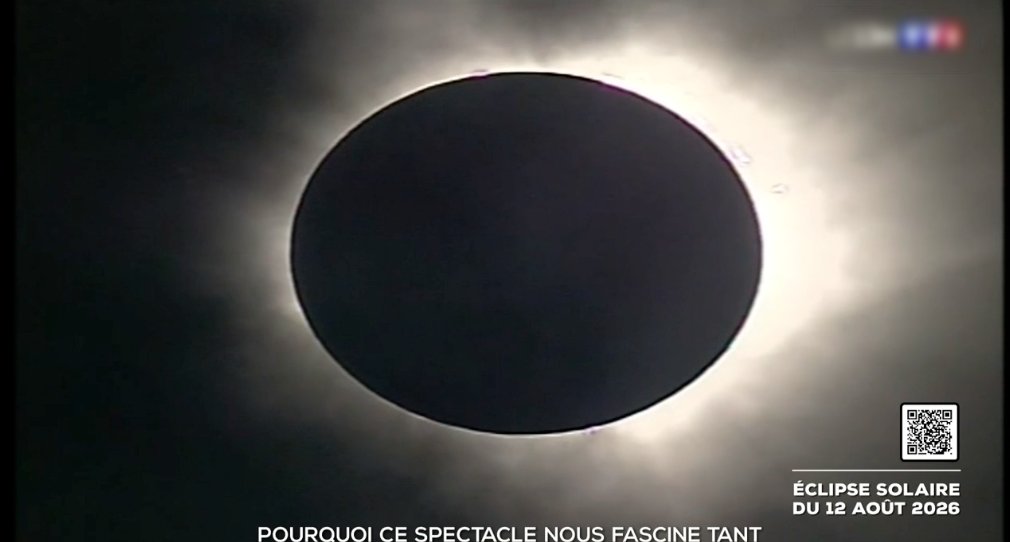
At the peak of the eclipse, a major national TV network in France invited its lunchtime audience to scan a Unitag QR code shown live on air. No advance notice, which means no cache pre-warming and no reserved capacity: the servers could not be braced. Within sixty seconds, traffic climbed from a few hundred requests per minute to roughly 34,000. This is what the platform recorded.
≈ 34,000
requests per minute at peak, up from a few hundred one minute earlier
90,000+
requests absorbed in five minutes
2.1 ms
response time for 95% of requests, at the very top of the spike
0%
failed transactions: every scan resolved
If the infrastructure fails at that moment, the largest audience of the day scans a dead QR code. Not one scan was lost. Every switch you set in the Scheduler runs on the same infrastructure.
Figures from Unitag’s production monitoring (edge access logs), 12 August 2026, 11:00–13:35 CEST.Around the broadcast
Created by your systems, watched on the dashboard
The Scheduler sits on the same platform as the rest of the setup: the API upstream to create the QR codes, monitoring in between, analytics downstream to read every on-air moment.
Push API: your tools create the QR codes
The Unitag API creates QR codes straight from your production systems: one per show, per fixture or per segment, with no manual entry. Engineering integrates once; the graphics team picks them up ready-made.
Links checked before air
Healthchecks watch every destination and flag a broken link while there is still time to fix it, ahead of the show rather than during it.
Scans, minute by minute
The dashboard shows scans as they happen. The effect of an on-air moment can be read during the broadcast, each episode compares against the last, and exports feed your audience reports.
Frequently asked questions
Before you schedule your first switch
Which plans include the Scheduler?
The Scheduler is an app on the Unitag dashboard; availability depends on the plan you choose. The breakdown is on the pricing page; for a full broadcast setup, talk to our team directly.
What happens if the show overruns?
You keep control. A dynamic QR code’s destination can be edited by hand at any moment, including during the show, and a scheduled switch can be moved or cancelled until it fires.
Do existing QR codes need regenerating?
No. The Scheduler works on existing dynamic QR codes: graphics, print and packaging stay exactly as they are.
Does this only work for television?
Any QR code whose destination must change at a known date behaves the same way: fixed-date promotions, event signage, packaging that activates at launch, competitions that open and close.
Where is scan data hosted?
In the European Union. The platform is EU-hosted and GDPR-compliant, which matters to the legal teams of media groups reviewing the setup.
Your next live show can be set up the day before
Create a dynamic QR code, add two scheduled switches, and watch the destination change on time. It takes a few minutes.
Start a trial on the consoleRunning a full broadcast grid? Book a demo and we’ll show you how broadcasters structure their on-air QR Codes.